
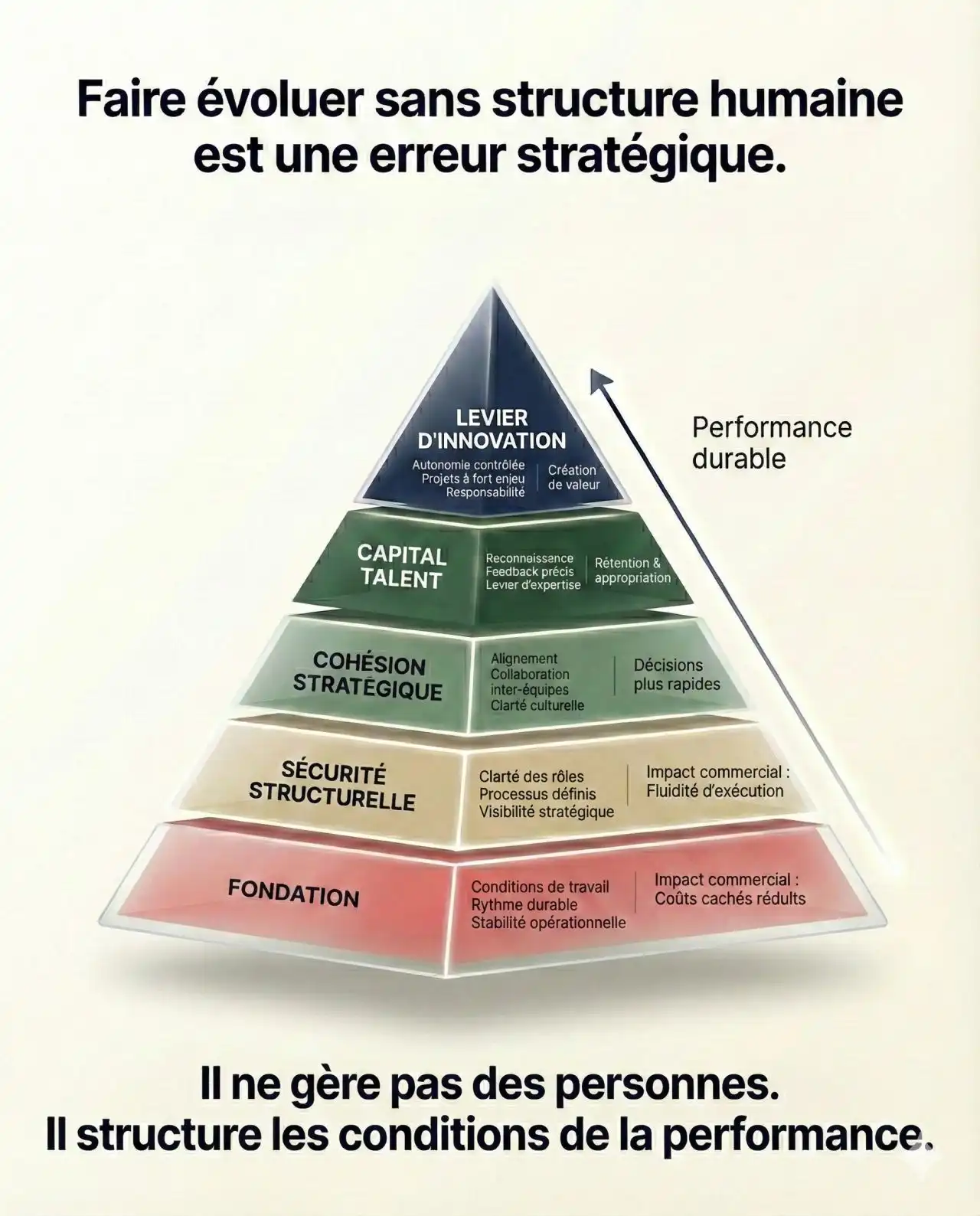
Discover why organizational structure is essential for sustainable performance. Learn the five-level pyramid of organizational performance, from foundations and strategic cohesion to talent capital and innovation.
Structuring the Organization for Sustainable Performance (Instead of “Managing People”)
In a context where markets, technology, and talent expectations evolve constantly, a weak or absent organizational structure becomes a major strategic risk. McKinsey’s research on organizational health shows that healthy organizations deliver up to three times the total shareholder return of unhealthy ones, and that organizational health is one of the strongest predictors of long-term value creation.
Central message: a leader does not “manage people”; a leader designs the conditions for performance. In other words, the real lever of strategic management is not individual motivation, but the design of an organizational structure that makes team performance likely, sustainable, and scalable.
Last updated: 2026
Why companies often fail because of lack of structure
Many companies do not fail because their people lack talent, but because the organizational structure is unclear, fragile, or toxic. When the system is poorly designed, no amount of individual heroics can compensate for long.
Typical symptoms of an organization without robust human structure include:
Dependency on “hero” individuals
Without clear roles and robust processes, performance relies on a few key people who compensate for systemic gaps. When they leave or burn out, performance collapses.Conflicting priorities and slow decisions
A lack of clear governance, decision rights, and strategic visibility generates endless meetings, constant escalations, and decision fatigue at the top.A survival culture instead of sustainable performance
When the system only holds together through extra effort, motivation erodes, turnover increases, and high-value talent leaves for better-structured organizations.
McKinsey’s work on organizational health confirms that organizations with clear structures, aligned leadership, and strong management practices are more resilient, less exposed to crises, and significantly more performant over time. Not investing in structure is effectively accepting fragile performance as your operating model.
The pyramid of organizational performance
To move from accidental performance to architected performance, it is useful to think of the organization as a five-level pyramid:
Foundation
Structural safety
Strategic cohesion
Talent capital
Innovation leverage
Each level rests on the previous one. Trying to “innovate” on top of a weak foundation is like adding floors to a building with cracked foundations.
1. Foundation: working conditions and operational stability
The foundation covers all the elements that guarantee a healthy, stable, and predictable work environment day to day. It is the baseline on which any sustainable performance rests.
Key components include:
decent working conditions (workload, schedules, tools, physical and digital environment)
work organization that protects health, energy, and basic work–life balance
clear operational standards to execute routine work without constant friction
Systematic reviews on organizational-level interventions show that improving how work is organized (clarity, workload, time, resources) leads to better employee health, higher retention, and in many cases better performance outcomes. Sustainable performance starts with the quality of the “playing field,” not with more pressure on individuals.
Key question for leaders:
“Am I asking for sustainable performance in an environment that makes it possible, or in an environment that inherently blocks it?”
2. Structural safety: roles, processes, and strategic visibility
Structural safety is the organization’s ability to operate without permanent chaos because structures are clear, robust, and understood. It is not about bureaucracy; it is about clarity and reliability.
It rests on three pillars:
Role and responsibility clarity
Who decides what? Who is accountable for which outcomes? How are trade-offs made? Healthy organizations define decision rights, accountabilities, and escalation paths explicitly, which speeds up execution.Management processes and strategic rituals
Steering committees, performance reviews, alignment meetings, and decision forums are the “rails” of strategic management. When designed intentionally, they allow coordination without micromanagement.Strategic visibility
Teams have access to a clear vision, measurable objectives, and a small set of prioritized, visible initiatives. McKinsey highlights “strategic clarity” as a critical dimension of organizational health and sustainable performance.
Without structural safety, people spend more time clarifying expectations, resolving conflicts, and compensating for ambiguity than actually creating value.
3. Strategic cohesion: aligning teams on the same direction
Strategic cohesion is the organization’s ability to align all levels – from the executive team to frontline teams – on one coherent direction.
In practice, this means:
a shared strategic narrative (why we exist, where we are going, how we win)
a clear cascade of objectives (company → business units → teams → individuals)
performance indicators that are coherent across functions, not contradictory (for example, sales targets aligned with customer experience indicators)
McKinsey’s research shows that organizations with strong strategic clarity and cohesion, translated into operational objectives, outperform and are more resilient in volatile environments.
Core idea: team performance is first a problem of alignment, not of isolated motivation. A brilliant but misaligned team can destroy more value than an average team that is tightly aligned on a coherent strategy.
4. Talent capital: developing and retaining key people
Talent capital is the strategic asset that turns a good structure into a lasting competitive advantage. It goes beyond HR administration; it is about how the organization identifies, positions, and grows its key people.
Research in management and HR shows that:
sound talent management practices (development, feedback, career paths) correlate with better organizational performance across sectors
organizations that invest in employee well-being and perceived organizational support see higher engagement and better overall performance outcomes
Peter Drucker stressed that the fundamental task of management is to make people capable of joint performance, to make their strengths effective and their weaknesses irrelevant, through common goals, shared values, and the right structure. That is precisely the job of modern organizational leadership: to orchestrate talent capital within a system that maximizes the leverage of strengths.
5. Innovation leverage: autonomy, psychological safety, and value creation
At the top of the pyramid, innovation leverage is about creating an environment where teams can safely experiment, learn, and propose new solutions once foundations, structure, and alignment are in place.
Amy Edmondson’s seminal work on psychological safety shows that:
teams that feel safe to discuss errors, ask questions, and challenge the status quo learn faster and perform better over time
psychological safety is a critical factor in complex, uncertain environments and has been linked to higher innovation and better risk management in multiple studies and Harvard Business Review articles
In practice, innovation leverage is activated through:
real autonomy within a clear strategic frame
explicit permission to run disciplined experiments and learn from them
structured channels and rituals to surface ideas and learning across the organization
Innovation is therefore not the result of isolated “genius,” but of a system where structure, alignment, talent, and psychological safety make initiative rational and rewarding rather than costly.
Why leaders must structure performance, not manage people
One of the most expensive confusions in leadership is believing that the leader’s role is to “manage people” instead of designing a system of performance.
Three reasons make this shift non‑negotiable:
System leverage is stronger than individual leverage
McKinsey’s research on organizational health demonstrates that the impact of clear structures, strong processes, and coherent leadership is far greater than the impact of a few exceptional individuals in a weak system.Control-based management has hit its limits
Contemporary research and practitioner experience show that successful leaders are moving from controller to coach: they provide clear direction and boundaries, then push decision-making closer to the work. This shift improves decision quality and engagement.Modern complexity exceeds any single person’s capacity
In a world of high interdependence and uncertainty, performance comes from the quality of collaboration, not just the brilliance of each contributor. Psychological safety and structural clarity become prerequisites for effective cooperation.
In Drucker’s terms, the fundamental task of management is to make people capable of joint performance through shared goals, values, structure, and development. Put simply:
A 20th‑century leader managed “who does what”.
A 21st‑century leader designs “the system in which people work”.
Practical applications for leaders and entrepreneurs
1. Diagnose the health of your organizational structure
Map your core value streams (from lead to revenue, from idea to product launch, from incident to resolution).
Identify where rework, bottlenecks, and conflicting priorities actually occur.
Measure role clarity, decision quality, and how people perceive workload, coordination, and support.
McKinsey’s Organizational Health Index is one example of how to systematically measure these dimensions and use them to steer sustainable performance.
2. Strengthen structural safety without adding bureaucracy
Simplify reporting lines and clarify responsibilities for each key role.
Establish a few focused management rituals: weekly team review, monthly strategy–execution review, quarterly priorities reset.
Make decisions visible: who decided what, why, and on what time horizon.
The goal is not more meetings, but a visible, predictable backbone for strategic management.
3. Work on strategic cohesion every day
Translate your strategy into operational language: concrete objectives, a handful of KPIs, and a short list of priorities.
Cascade this strategy to every team so that team objectives clearly support company objectives.
Align incentives and metrics across functions to avoid contradictory targets (for example, short‑term sales targets that undermine long‑term customer value).
4. Treat talent capital as an asset, not a support function
Identify roles that are truly critical for sustainable performance (often including non‑executive experts).
Build clear development paths and structured feedback loops for these roles.
Invest in well-being, flexibility, and perceived support, which have been shown to drive higher engagement, retention, and performance.
5. Make psychological safety a leadership standard
Train managers in constructive feedback, active listening, and how to treat errors as learning opportunities rather than as occasions for blame.
Normalize talking about problems openly, including at executive level, without scapegoating.
Recognize and reward behaviors that surface risks and opportunities early, not only “perfect outcomes”.
Edmondson’s research and later studies show that teams with high psychological safety report more errors, learn faster, and ultimately perform better than teams where people stay silent.
6. A simple self‑assessment: one question per level of the pyramid
| Pyramid level | Question for the leader |
|---|---|
| Foundation | Am I asking for sustainable performance in working conditions that truly support it? |
| Structural safety | Are roles, processes, and decisions clear and visible to the people doing the work? |
| Strategic cohesion | Can most teams explain our strategy and this quarter’s priorities in simple language? |
| Talent capital | Do we proactively identify, develop, and protect our truly critical talent? |
| Innovation leverage | To what extent do teams feel safe and empowered to propose, test, and learn? |
Used consistently, this lens helps leaders manage the system rather than micromanage individuals.
FAQ – organizational structure, team performance, and human capital
Why is organizational structure essential?
Organizational structure defines how decisions are made, how information flows, and how value is created day to day. McKinsey’s research shows that organizations with strong organizational health and clear structure deliver higher financial performance, better resilience, and stronger long‑term value creation than peers.
How can I improve the performance of a team?
Improving team performance requires working on three levers at once: a clear frame (goals, roles, priorities), sustainable working conditions, and psychological safety that makes it safe to talk about problems, errors, and ideas. Studies consistently show that teams with high psychological safety and clear goals learn faster, innovate more, and achieve better results, especially in complex environments.
What is strategic cohesion?
Strategic cohesion is the degree to which the organization’s vision, strategy, operational objectives, and daily decisions are truly aligned. When strategic cohesion is high, every team understands how its work contributes to sustainable performance and can prioritize accordingly; when it is low, local optimizations undermine global performance.
How can a company develop its human capital?
Developing human capital means treating people as a strategic asset: identifying critical roles, investing in skills and leadership development, providing clear career paths, and building a healthy work environment. Research on sustainable HR practices shows that organizations combining development, support, and fair work design see higher engagement, retention, and organizational performance.
How does psychological safety support sustainable performance?
Psychological safety – the shared belief that it is safe to take interpersonal risks – fosters learning, innovation, and rapid problem‑solving. Edmondson’s studies, echoed by Harvard Business Review and others, show that high‑performing teams do not make fewer mistakes; they surface and address them faster because people feel safe to speak up.
Author:
Yassine Tibari
CEO / COO / AI, Data and Business Scaling Strategist
Founder of TIBARI.ORG, Yassine Tibari supports CEOs and leadership teams in structuring performance systems, designing strategic management architectures, and using AI as a lever for sustainable growth, drawing on leading international research and practices from McKinsey, Harvard Business Review, Peter Drucker, and Amy Edmondson.